Monitoring
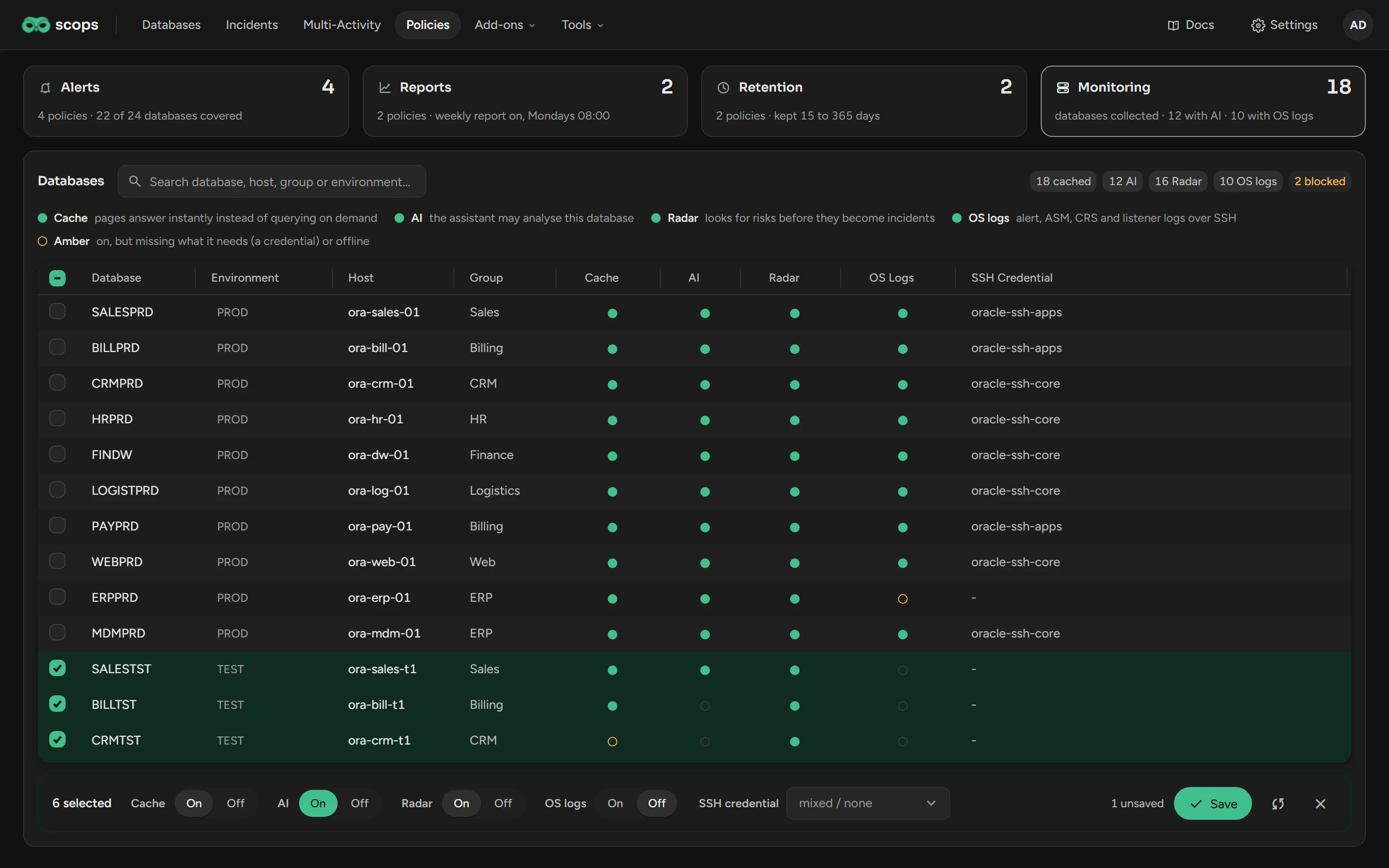
Monitoring turns four switches on or off for many databases at one time. Open Policies › Monitoring.
Before you begin
Changes need Manage databases. Monitoring is not a policy: each database has its own switches.
Change a switch
Select the databases.
In the bar at the bottom, click On or Off for each switch.
For OS logs, select an SSH credential if necessary.
Click Save.
When you turn off the cache, Scops asks you to confirm. The pages of those databases become slower. Scops does not record their change events, and they are not in the all-database views.
What the switches do
| Switch | When it is on |
|---|---|
| Cache | The pages of the database open at once. See Cache. |
| AI | Scops AI can analyze the database. |
| Radar | Radar Engine looks for risks on the database. |
| OS Logs | Scops reads the alert, ASM, CRS and listener logs over SSH. |
A filled dot is on. An empty ring is off. An amber ring is on but does not work: there is no credential, or the database is offline.
Related
PoliciesThe four kinds of policy.
CacheWhat the cache keeps ready.
How Radar worksThe risks that Radar finds.
Updated October 30, 2026