Ports and network
Find the Scops address, change its ports and open the firewall. Users need only the HTTPS port.
Find the address of a server
Users open https://<server>:5138 by default. To see the port on the Scops server, look at one of these:
- the Scops shortcut;
- the description of the ScopsWeb service in
services.msc; "HttpsPort"inC:\Program Files\Scops\blazor\appsettings.json.
Change the ports
You need Manage Settings.
In Settings › Connection, find the Ports group.
Type the new ports: from 1024 to 65535, free, and different from each other.
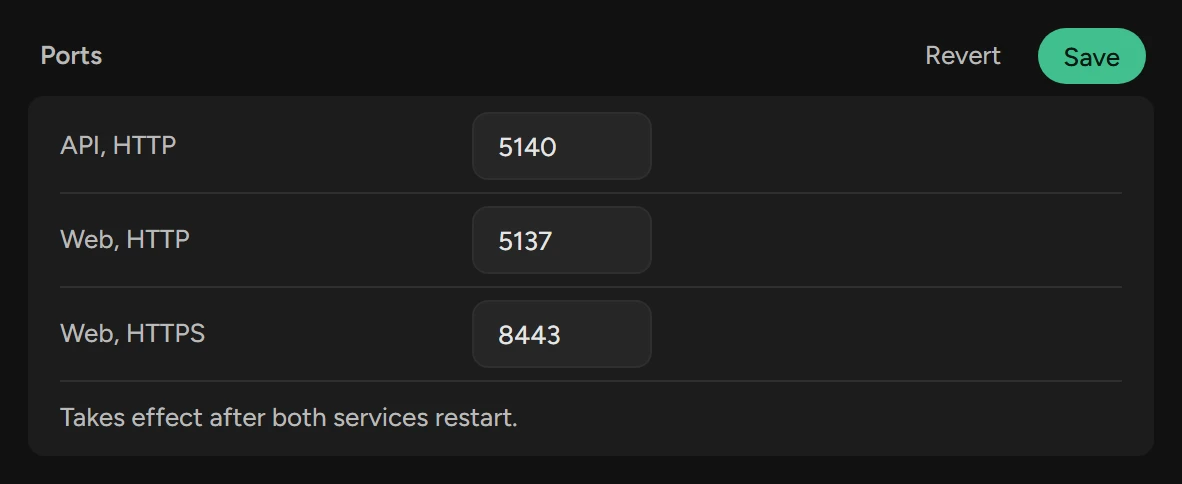
Click Save.
Restart the ScopsWeb and ScopsApi services.
The saved ports have priority over the configuration files. A new port needs no new firewall rule. If a saved port is not free at start, see A port is taken.
Open the firewall
Setup adds the inbound rule Scops Web Interface, unless you clear its task. If you cleared it, add a rule for the HTTPS port as administrator. Use a different name, because an upgrade replaces Scops Web Interface.
netsh advfirewall firewall add rule name="Scops HTTPS 5138" ^
  dir=in action=allow protocol=TCP localport=5138
Do not open the HTTP port or the API port.
Use a reverse proxy
A proxy on the Scops server can forward to http://localhost:5137. It must pass WebSocket connections.
For a proxy on a different machine, open the HTTP port to the network:
Add
"HttpBind": "Any"to theServerblock ofC:\Program Files\Scops\blazor\appsettings.json:"Server": { "HttpPort": 5137, "HttpsPort": 5138, "HttpBind": "Any" }Restart the ScopsWeb service.
Find a host without a domain
A database can report a host name with no domain. The DNS search list of the Scops server finds it. If it does not:
Open
api\appsettings.json. UnderServer, add the domains to try, in order:"DnsSuffixes": "db.example.com;corp.example.com"Restart the ScopsApi service.
Ports Scops listens on
| Default port | Service | Who can reach it |
|---|---|---|
| 5138, HTTPS | ScopsWeb | All computers that the firewall lets in. |
| 5137, HTTP | ScopsWeb | This server only. It sends passwords without encryption. |
| 5140, HTTP | ScopsApi | This server only. |
Connections Scops makes
All these connections start on the Scops server:
| To | Port | When |
|---|---|---|
| The repository listener | Usually 1521 | Always. |
| The listener of each database | Usually 1521 | Always. |
| The database hosts, over SSH | Usually 22 | For OS logs. |
| Your mail server | As set in Settings › Email | When Scops sends mail. |
| Your trap receiver | As set in Settings › Email | When Send traps is on. |
| Your directory server | 389, or 636 for LDAPS | When Sign in with LDAP is on. |
| The AI model endpoint | Usually 443 | When you set up Scops AI. |
https://scops.dev | 443 | Only when you click Activate. If the server cannot reach it, your browser sends the request. |
Scops makes no other internet connection: no update check and no usage data.
Related
Updated October 31, 2026